Payslips your staff can actually read.
When payroll is committed, every employee gets a clear payslip by WhatsApp, email, the staff app or on paper. Each line shows its working, so the questions stop at the payslip and not at HR’s door.
Every way your staff get it.
The same payslip, wherever each person is easiest to reach. Nobody has to come to the office for a piece of paper.
One click sends everyone on the run a WhatsApp message with a short link to their own payslip PDF. Staff can also text payslip to the PunchClock number at any time for their latest one.
Payslips go to every employee with an email address on file. You can also email a whole run as one PDF to any address, your accountant’s for example.
The PunchClock app on Android and iPhone lists their last 20 payslips with the net pay, each one ready to open as a PDF.
Payslip history sits in the web portal next to their leave requests, for anyone who prefers a browser.
Print any run or save it as a PDF, including a compact print with four payslips across the page to cut and hand out. Staff without an email address can be printed as a batch.
Type “email last week’s payslips” and the AI assistant finds the pay run and emails the payslips for you.
A payslip that explains itself.
Every amount is the figure from the committed payroll, nothing recalculated. What changes is how much of the working your staff can see.
 1
2
3
4
5
6
7
8
9
1
2
3
4
5
6
7
8
9
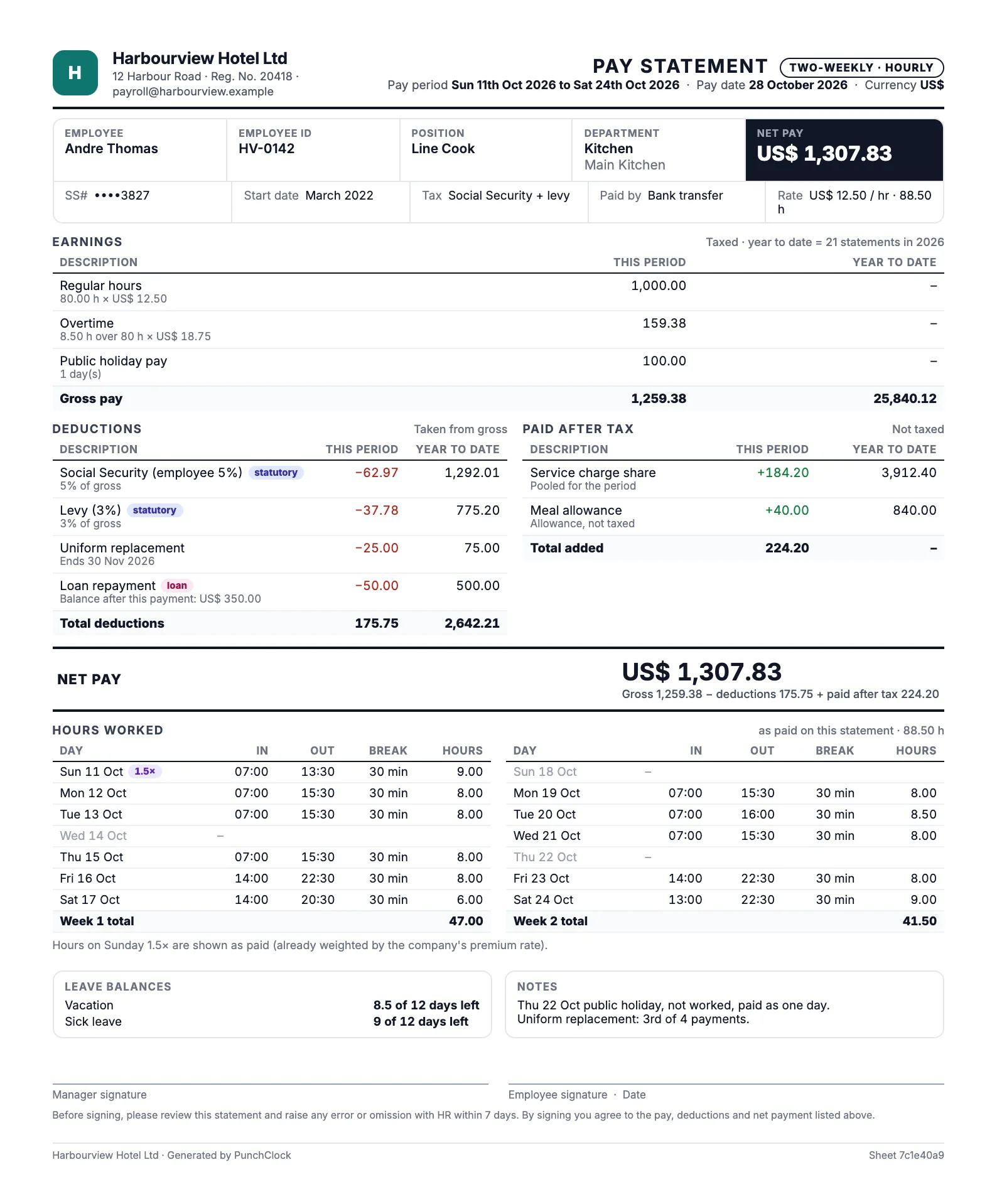
Period, pay date and pay basis
The pay period, the date the money is paid and a tag such as
Two-weekly · HourlyorMonthly · Salaried.Net pay up front
Name, employee number, position and department sit next to the net pay. The social security number is masked to its last four digits.
Earnings with the working
Hours times rate on each line, overtime with the threshold it passed, plus holiday, vacation and sick pay. The lines always add up to the gross on the payroll.
Year to date
From the second payslip of the year, a year-to-date column runs alongside gross, statutory deductions, loans, allowances and service charge.
Deductions, with the reason
Statutory deductions are tagged and show their rate. Other deductions carry the reason you entered, and a loan shows the balance left after this payment.
Paid after tax
Allowances that are not taxed, service charge or tips, call-outs and credits, kept apart from taxed earnings so the tax lines make sense.
The sum, written out
Net pay again at the bottom, with the arithmetic beside it:
gross − deductions + paid after tax.Hours by day
For hourly staff: in, out, break and paid hours for each day, with weekly totals. Days paid at a premium carry a tag like 1.5×.
Leave balances and notes
Days left for vacation, sick leave and other leave types, and any notes HR added to the timesheet.
Your pay rules, written in plain words.
PunchClock works the pay out from the punches and your settings. The payslip then names each rule where it was used.
Set up for your country’s rules.
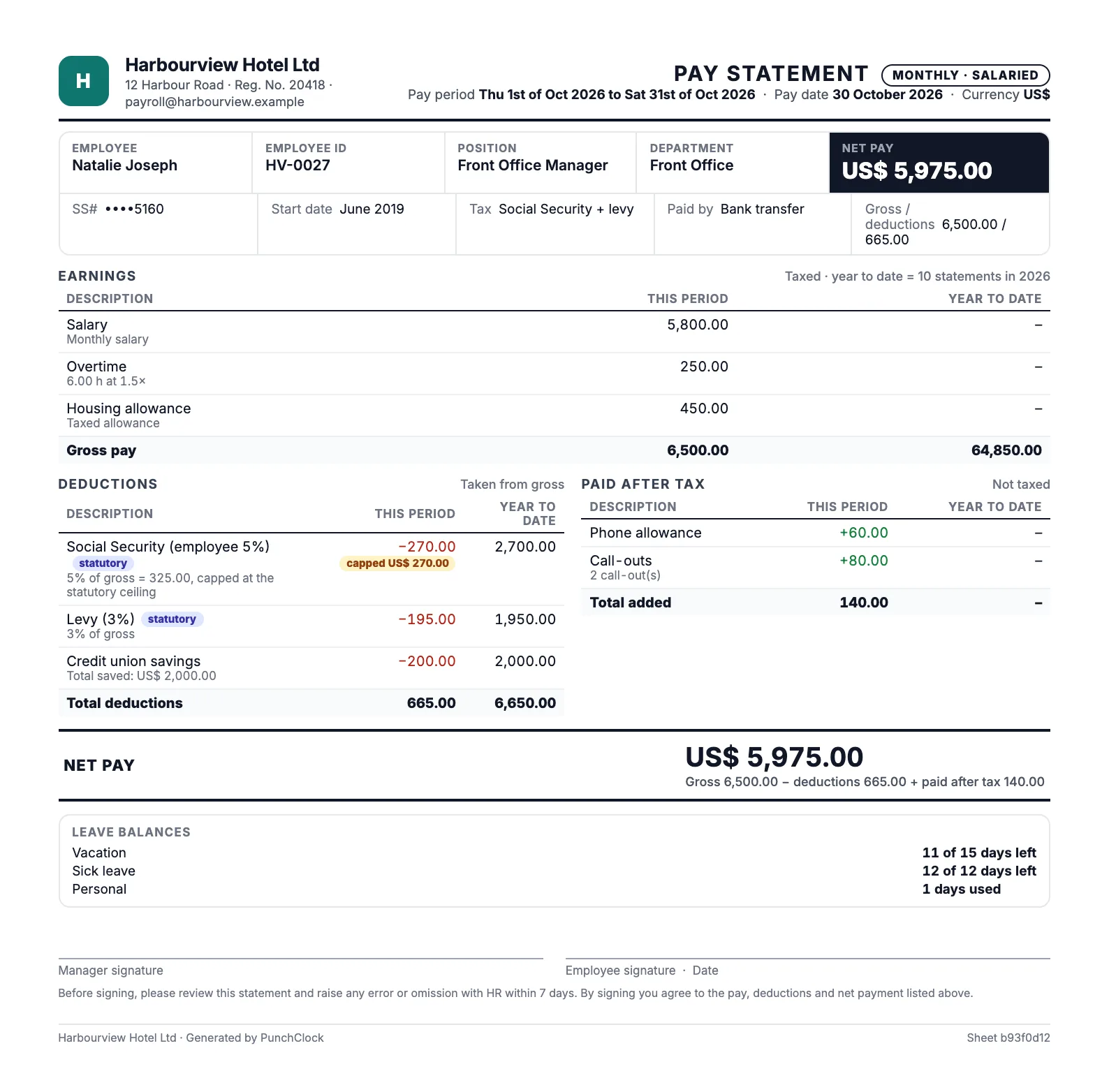
Every country has its own deductions. Social security, levies, medical and other contributions all come with their own rates, ceilings and thresholds. Our team configures your payroll to match yours, so every payslip takes off exactly what your country requires.
Country A
Country B
Country C
Same gross pay. Three countries. Three correct payslips.
Keep your payslip, or switch to the Pay Statement.
Each company chooses its own payslip design. Nothing changes until you ask us to switch, and you can switch back.
Classic or Pay Statement
Stay on the classic payslip your staff already know, or move to the Pay Statement shown on this page.
How much time to show
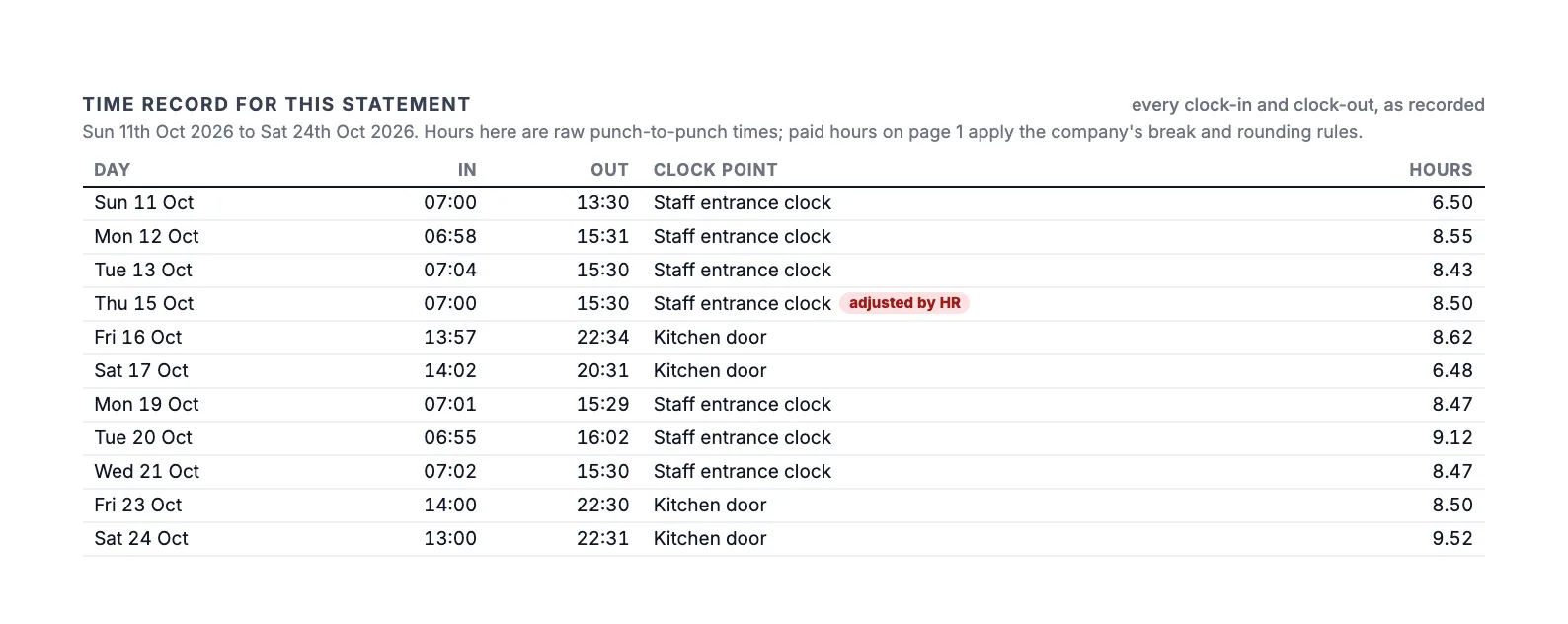
Hours by day on the payslip, a second page with every clock-in and clock-out and where it was made, both, or none.
Leave balances
Show what each person has left of every leave type, or leave the box off.
The right date, and a record of every send.
Pay date for each run
Set the pay date on the run’s Payslips tab and every Pay Statement in that run prints it. Leave it blank and the payslip shows the last day of the period.
Every WhatsApp send logged
Each payslip sent by WhatsApp goes into the Activity Log: who sent it, the employee, the number and whether it went through. Payslips are only ever made from committed payroll.
About payslips.
Can employees get their payslip on WhatsApp?
Yes. One click sends each person on the pay run a WhatsApp message with a short link to their own payslip as a PDF. Staff can also text “payslip” to the PunchClock WhatsApp number from their registered phone to get their latest one.
Do staff need the app to get a payslip?
No. Payslips also go out by email and WhatsApp, sit in the staff web portal, and can be printed. The app simply keeps their last 20 payslips in one place.
Can the payslip show the hours worked?
Yes. Choose hours by day on the payslip, a separate time-record page with every clock-in and clock-out, both, or none.
Does it work for salaried and hourly staff?
Yes, on weekly, two-weekly, semi-monthly and monthly pay periods. Salaried payslips show the salary plus any overtime, allowances and extra days.
Are the numbers on the payslip recalculated?
No. The Pay Statement prints the figures from the committed payroll, so it always matches what payroll worked out.
Can I set the date staff are paid?
Yes, once per pay run. Every Pay Statement in the run shows it; if you leave it blank the payslip shows the last day of the period.
Will it handle our country’s deductions?
Yes. Our team sets up your payroll with your country’s statutory deductions, rates and ceilings, and each employee’s deduction status, so the payslip matches what your country requires.
Can I send a whole run to our accountant?
Yes. Email the full run as one PDF to any address, or print it. The compact print fits four payslips across a page.
See your own payslip in PunchClock.
Bring a pay run to the demo and we will show it to you as a Pay Statement, then send one to your phone.