Tip pool split template for Excel
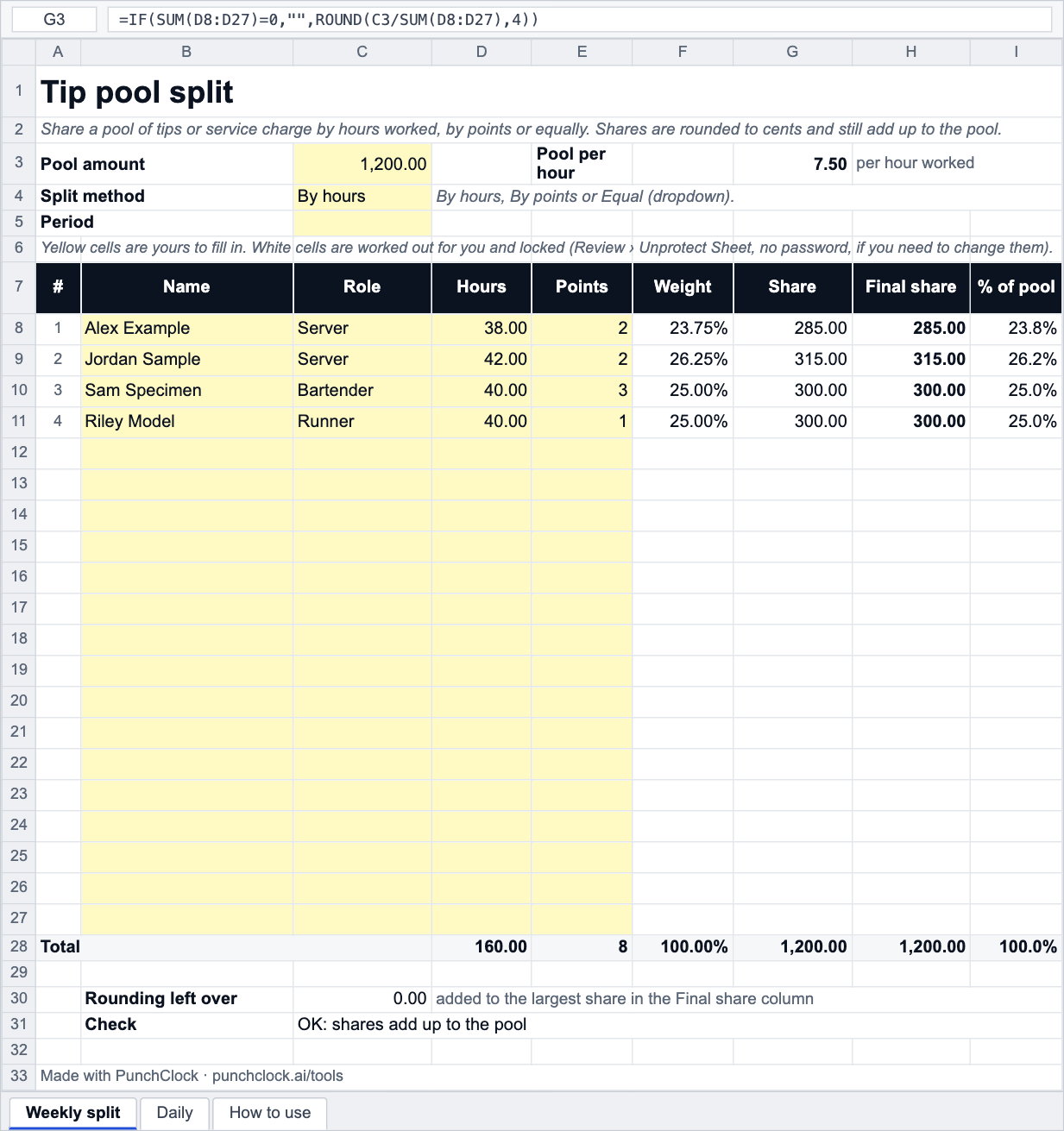
Enter the pool and the people with their hours or points, choose By hours, By points or Equal, and every share is worked out, rounded to cents and checked so the shares add up to the pool. A daily sheet does a pool per day for seven days with a weekly summary.
- No sign-up
- Excel, Google Sheets, LibreOffice
- Formulas, no macros
- Prints on A4 or Letter
About this template
Tip pools fall out over two things: the method and the cents. This template makes both visible. The method is one dropdown: By hours (a share in proportion to hours worked), By points (a share in proportion to a points value you give each role) or Equal (by headcount). The weight column shows each person's fraction before any money is attached, so the team can see why the shares are what they are.
Shares are rounded to two decimals, which means they rarely add up to the pool exactly; the template puts the difference (usually a cent or two) on the largest share and shows the adjustment, so the Final share column always totals the pool. It is the same arithmetic as the tip pool calculator, in a file you can keep.
Whether service charge belongs to staff, who may be in the pool, and what an employer may deduct are set by law and by your policy, and differ by country; the template only does the sums. The tips and service charge guide covers the common rules.
Background reading: Tips and service charge
How it works
- Download the file and open it in Excel, Google Sheets or LibreOffice.
- On Weekly split enter the Pool amount and choose the Split method.
- List the people with their hours (and points, if you weight roles).
- Read the Weight, Share and Final share columns; the Check line should say the shares add up to the pool.
- For a pool per day use the Daily sheet: a pool and each person's hours for each of seven days, with the weekly summary on the right.
Frequently asked questions
How is a share by hours worked out?
Share = pool × (the person's hours ÷ everyone's hours). With 1,200 in the pool and 160 hours in total, every hour is worth 7.50, so 38 hours earns 285.00. The template shows the pool per hour so that check is immediate.
What are points for?
Points weight roles. If bartenders get 3, servers 2 and runners 1, a share is points ÷ total points, regardless of hours. Some teams multiply points by hours; to do that, type hours × points into the Points column and split By points.
Why do my shares not add up to the pool?
Rounding each share to cents can leave a few cents over or under. The Final share column adds that difference to the largest share so the total equals the pool; the Rounding left over line shows how much that was. If the Check says the shares do not match, the pool or the hours are probably blank.
Can I split a pool per day instead of per week?
Yes: the Daily sheet takes a pool per day and hours per person per day, shares each day by hours, and sums the week per person. Rounding on the Daily sheet is per day and any leftover cents are shown per day for you to assign.
Does it handle service charge as well as tips?
The arithmetic is the same: a pool of money divided by hours, points or headcount. What may go into the pool and who may take part is a legal and policy question; see the guide.
Free to download and use, including at work; no sign-up and no tracking inside the file. The template does the arithmetic with the numbers you give it: it has no tax rates and no legal limits built in, because pay, overtime and leave rules are set by each country's law and by your contract. Check anything that matters with your labour department or payroll.
Do this automatically
PunchClock splits the service charge from clocked hours and puts each share on the payslip, with the method and weighting set once.