Weekly timesheet template for Excel
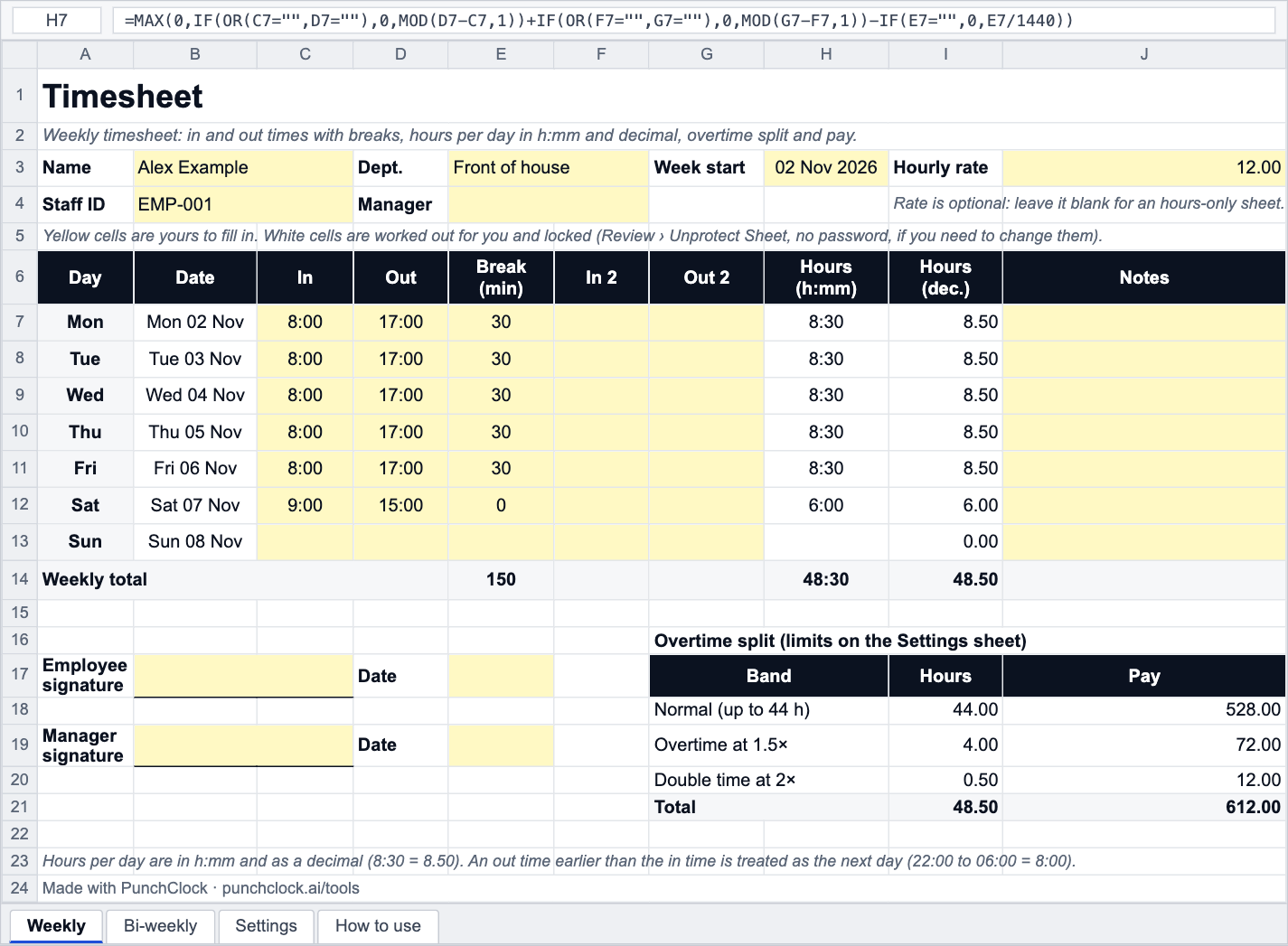
In and out times, a break in minutes and an optional second shift per day. Hours in h:mm and decimal, the weekly total, overtime at 1.5× and 2× with limits you can change, pay if you add a rate, and signature lines. A bi-weekly sheet is included.
- No sign-up
- Excel, Google Sheets, LibreOffice
- Formulas, no macros
- Prints on A4 or Letter
About this template
This is a plain, printable timesheet that does the adding up. Type the times a person started and finished each day and the unpaid break in minutes, and the sheet gives you the hours per day in both h:mm (8:30) and decimal (8.50), the weekly total, and how much of the week is normal time, time and a half and double time. Enter an hourly rate and it prices each band; leave the rate blank and it is an hours-only sheet.
The overtime limits live on a Settings sheet rather than inside the formulas: 44 hours before overtime and 48 before double time by default, the same defaults as our overtime calculator, because overtime rules are set by labour law and contracts and differ from place to place. 40, 44 and 48 are all common weekly limits. There are no tax rates or country rules in the file.
If you would rather add up a time card on screen without downloading anything, the time card calculator does the same arithmetic in the browser. For the background on counting periods, breaks and rounding, read from paper timesheets to automatic payroll.
Background reading: From paper timesheets to automatic payroll
How it works
- Download the file and open it in Excel, Google Sheets (File › Import) or LibreOffice.
- On the Weekly sheet type the name and the Week start date; the seven dates and day names fill in.
- Enter In and Out in 24-hour time (08:00, 17:30) and the unpaid Break in minutes. Use In 2 / Out 2 for a second shift on the same day.
- Read the hours per day and the weekly total. Add an Hourly rate to see normal, overtime and double-time pay.
- Check the Settings sheet: change the limits and multipliers to match your contract, or clear the double-time limit if you only have one overtime rate.
- Print or save as PDF (File › Print): the sheet fits one landscape page with the signature lines.
Frequently asked questions
How does the template work out hours between two times?
Each pair of times is MOD(out − in, 1), which is the difference in days with midnight handled: 08:00 to 17:00 is 0.375 of a day, and 22:00 to 06:00 wraps to 0.333 of a day (8 hours). The break in minutes is divided by 1,440 and taken off. The decimal column is the h:mm value times 24, rounded to two places.
Why are the hours shown as 8:30 and 8.50?
Payroll multiplies decimal hours by a rate, so 8 hours 30 minutes has to become 8.50, not 8.30. The sheet shows both so a person can check the clock time while payroll uses the decimal. The decimal hours converter explains the conversion.
Can I change the overtime limits?
Yes. The Settings sheet holds four cells: hours before overtime (44), the overtime multiplier (1.5), hours before double time (48) and the double-time multiplier (2). Every formula reads from there. Clear the double-time limit to have everything over the first limit paid at the overtime rate.
Is the sheet protected? I cannot edit a formula cell.
The formula cells are locked so they cannot be overwritten by accident; the yellow cells are open. There is no password: choose Review › Unprotect Sheet in Excel (Tools › Protect Sheet in LibreOffice) and everything is editable.
Does it work in Google Sheets?
Yes. Upload the file to Google Drive and open it, or use File › Import inside Sheets. The formulas, number formats and the Settings sheet all carry over; sheet protection becomes a Google Sheets protected range you can remove.
Free to download and use, including at work; no sign-up and no tracking inside the file. The template does the arithmetic with the numbers you give it: it has no tax rates and no legal limits built in, because pay, overtime and leave rules are set by each country's law and by your contract. Check anything that matters with your labour department or payroll.
Do this automatically
PunchClock fills the timesheet from real clock-ins, applies your overtime rules and sends the hours to payroll, so nobody keys a time card again.