Shift rota template for Excel
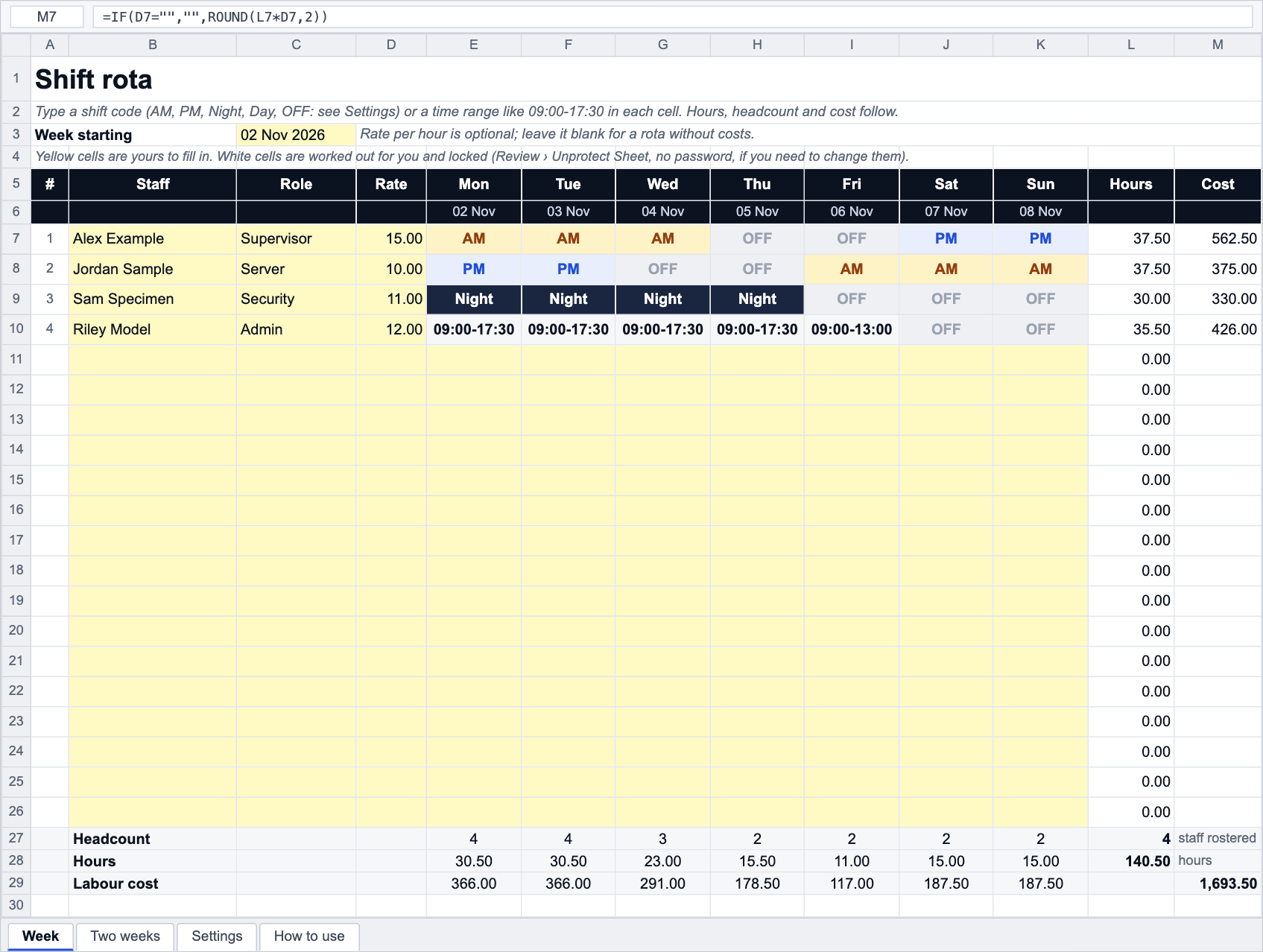
Staff down the side, Monday to Sunday across the top. Type a shift code (AM, PM, Night, Day, OFF) or a time range like 09:00-17:30 and the sheet works out paid hours per person, headcount and hours per day, and the labour cost when you add rates. Two-week sheet included.
- No sign-up
- Excel, Google Sheets, LibreOffice
- Formulas, no macros
- Prints on A4 or Letter
About this template
A rota has two jobs: tell people when they are working, and tell the manager what the week costs and whether every shift is covered. This template does both from one grid. Each cell takes either a shift code or a time range. Codes are looked up on the Settings sheet (start, end, unpaid break, so AM = 07:00 to 15:00 with 30 minutes off = 7.5 paid hours); a typed range such as 09:00-17:30 is parsed and the default break is taken off. Either way the paid hours flow into the totals.
Headcount per day is the number of people with hours on that day, which is the quickest coverage check. Labour cost per day and per week needs an hourly rate per person; leave the rates blank and the rota works as a schedule only. Nothing in the file assumes a country, a minimum wage or an overtime rule; if a person's week runs long, the overtime tracker or the overtime calculator will price it.
For how to build a fair rota (rest between shifts, notice, swapping, the law on changes to hours) read shift rota planning and changes to your hours.
Background reading: Shift rota planning
How it works
- Download the file and open it in Excel, Google Sheets or LibreOffice.
- On the Week sheet set the Week starting date; the day names and dates fill in.
- Type each person's name, role and, if you want costs, their hourly rate.
- Fill the grid with shift codes (AM, PM, Night, Day, Split, OFF) or time ranges (09:00-17:30). Cells colour themselves.
- Check the Settings sheet: edit the codes' start, end and break, add your own, and set the default break for typed ranges.
- Read hours and cost per person, headcount, hours and labour cost per day. Use the Two weeks sheet for a fortnight.
Frequently asked questions
How are the hours worked out from a shift code?
The Settings sheet has one row per code with a start time, an end time and an unpaid break in minutes. Paid hours = (end − start, wrapping past midnight) − break. A code the Settings sheet does not know counts as 0 hours but still shows on the rota, so a typo stands out in the hours block.
Can I type times instead of codes?
Yes. Anything with a dash is treated as a time range: 09:00-17:30, 6:00-14:00, 22:00-06:00. The default unpaid break on the Settings sheet is taken off. You can mix codes and ranges in the same week.
Does it handle night shifts that end the next day?
Yes. An end time earlier than the start time is treated as the next day, so 23:00 to 07:00 is 8 hours before the break. The hours land on the day the shift starts.
How do I add more staff or more codes?
Unprotect the sheet (no password), copy the last staff row on the Week sheet and the matching row in the hours block below, then extend the totals ranges. For codes, the Settings table has spare rows; type a code, its times and break, and it appears in the dropdown.
Can I see the cost of overtime in the rota?
The rota prices every hour at the person's rate. To split a long week into normal, overtime and double time use the overtime tracker (13 weeks per employee) or the overtime calculator for one week.
Free to download and use, including at work; no sign-up and no tracking inside the file. The template does the arithmetic with the numbers you give it: it has no tax rates and no legal limits built in, because pay, overtime and leave rules are set by each country's law and by your contract. Check anything that matters with your labour department or payroll.
Do this automatically
PunchClock publishes the rota to the staff app, compares it with real clock-ins and flags who is late or missing, with labour cost as you build it.