Leave tracker template for Excel
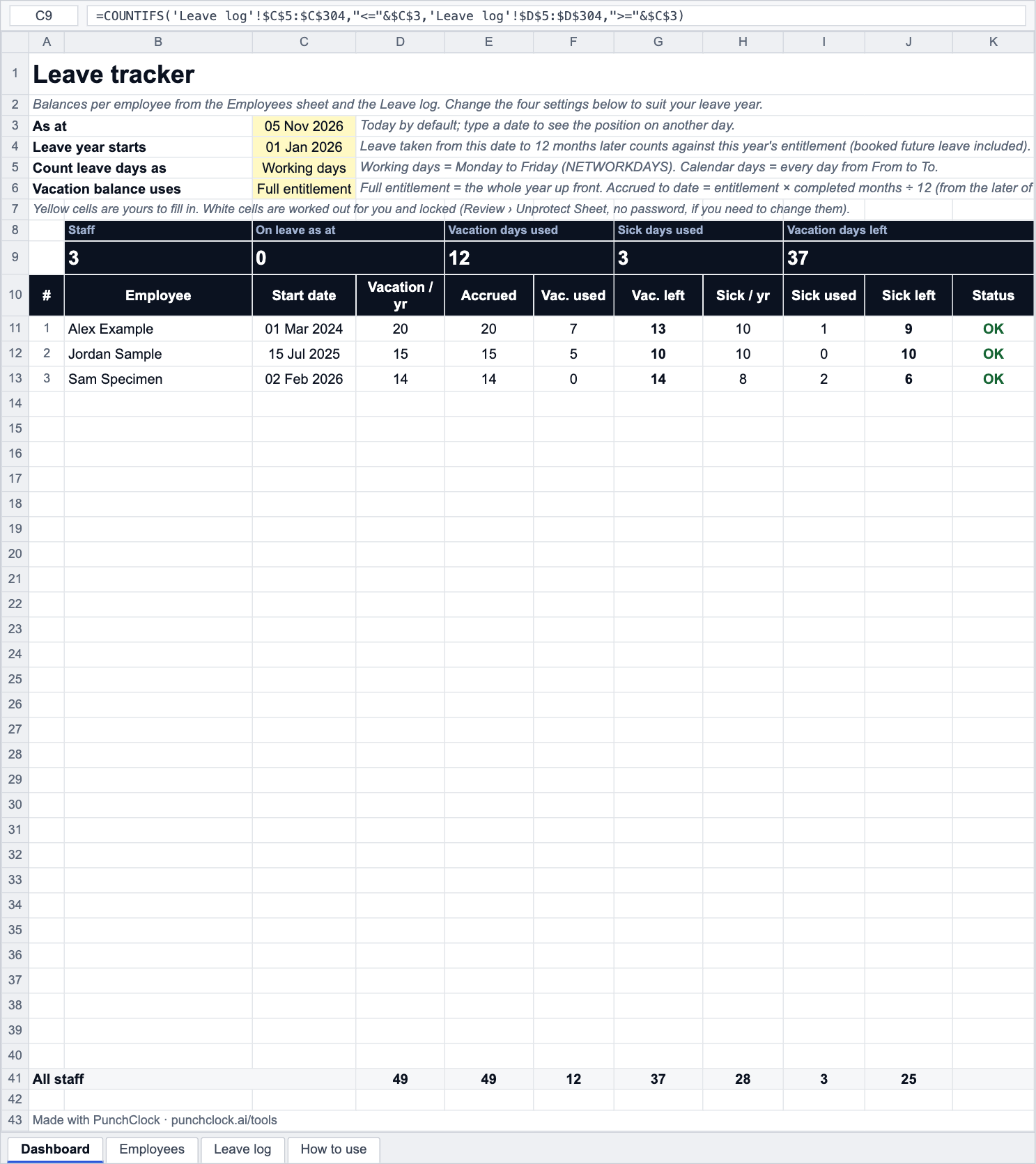
Vacation and sick leave for up to 30 people. Entitlements and start dates on one sheet, every spell of leave in a log (days counted as working days or calendar days), and a dashboard with accrued, used, remaining and a status flag per person as at any date.
- No sign-up
- Excel, Google Sheets, LibreOffice
- Formulas, no macros
- Prints on A4 or Letter
About this template
A leave tracker answers one question quickly: how many days does this person have left? To answer it you need three things in one place: the entitlement, the leave taken, and the rule for counting. This workbook keeps them on three sheets and does the arithmetic on the Dashboard. The log is one row per spell of leave; the days in a spell are counted either as working days (Monday to Friday) or as calendar days, with a single switch, so a Friday-to-Monday absence is 2 or 4 days depending on your rule.
Vacation can be shown as the full year's entitlement up front or as what has accrued so far (entitlement times completed months over twelve). Accrual starts from the later of the person's start date and the leave year start, so someone who joined in February accrues from February. There are no statutory entitlements, sick-pay rates or public-holiday dates built in: those are set by law where you work, and the file works with the numbers you give it.
For the policy side, how leave is requested and approved, and what sick pay typically looks like, read the leave approval process and sick pay explained. Public holidays by country are on the holidays pages.
Background reading: The leave approval process
How it works
- Download the file and open it in Excel, Google Sheets or LibreOffice.
- On Employees enter each person, their start date and their vacation and sick entitlement in days per year.
- On Leave log add a row per spell of leave: pick the employee and the type from the dropdowns, enter From and To. Days is worked out.
- On Dashboard set the leave year start, choose working or calendar days, and choose full entitlement or accrued to date.
- Read accrued, used, left and the status per person. Change As at to see the position on another date.
Frequently asked questions
How is "left" worked out?
Left = accrued (or the full entitlement, depending on the switch) minus used. Used adds the Days of every log row for that person and type whose From date falls in the leave year (year start to 12 months later), so leave booked for later in the year is already taken off. 20 days with 7 used is 13 left.
What does "accrued to date" do?
It shows entitlement × completed months ÷ 12, counted from the later of the start date and the leave year start up to the As at date, and capped at the full entitlement. A 20-day entitlement after 10 completed months shows 16.67 accrued. Used days are taken off that, so the balance can go negative (Status: Over) if someone took leave early.
Working days or calendar days?
Working days counts Monday to Friday between From and To inclusive (Excel's NETWORKDAYS). Calendar days counts every day. Public holidays are not excluded automatically; log a spell that spans a holiday as two rows, or shorten the dates.
Can I track other leave types?
The log has a third type, Other, for unpaid leave, compassionate leave and so on; it is recorded but not deducted from either balance. To add a counted type, unprotect the Dashboard and copy the sick columns with the new type name in the SUMIFS.
Does it do half days?
Yes for the balance: type a decimal entitlement if you need to, and for a half-day spell overwrite the Days cell after unprotecting the sheet, or log it as Other and adjust. The Dashboard shows balances to two decimals.
Free to download and use, including at work; no sign-up and no tracking inside the file. The template does the arithmetic with the numbers you give it: it has no tax rates and no legal limits built in, because pay, overtime and leave rules are set by each country's law and by your contract. Check anything that matters with your labour department or payroll.
Do this automatically
PunchClock keeps leave balances live: staff request time off in the app, approvers sign in order, accrual and carry-over follow your rules, and the balance is on the payslip.