Monthly attendance register for Excel
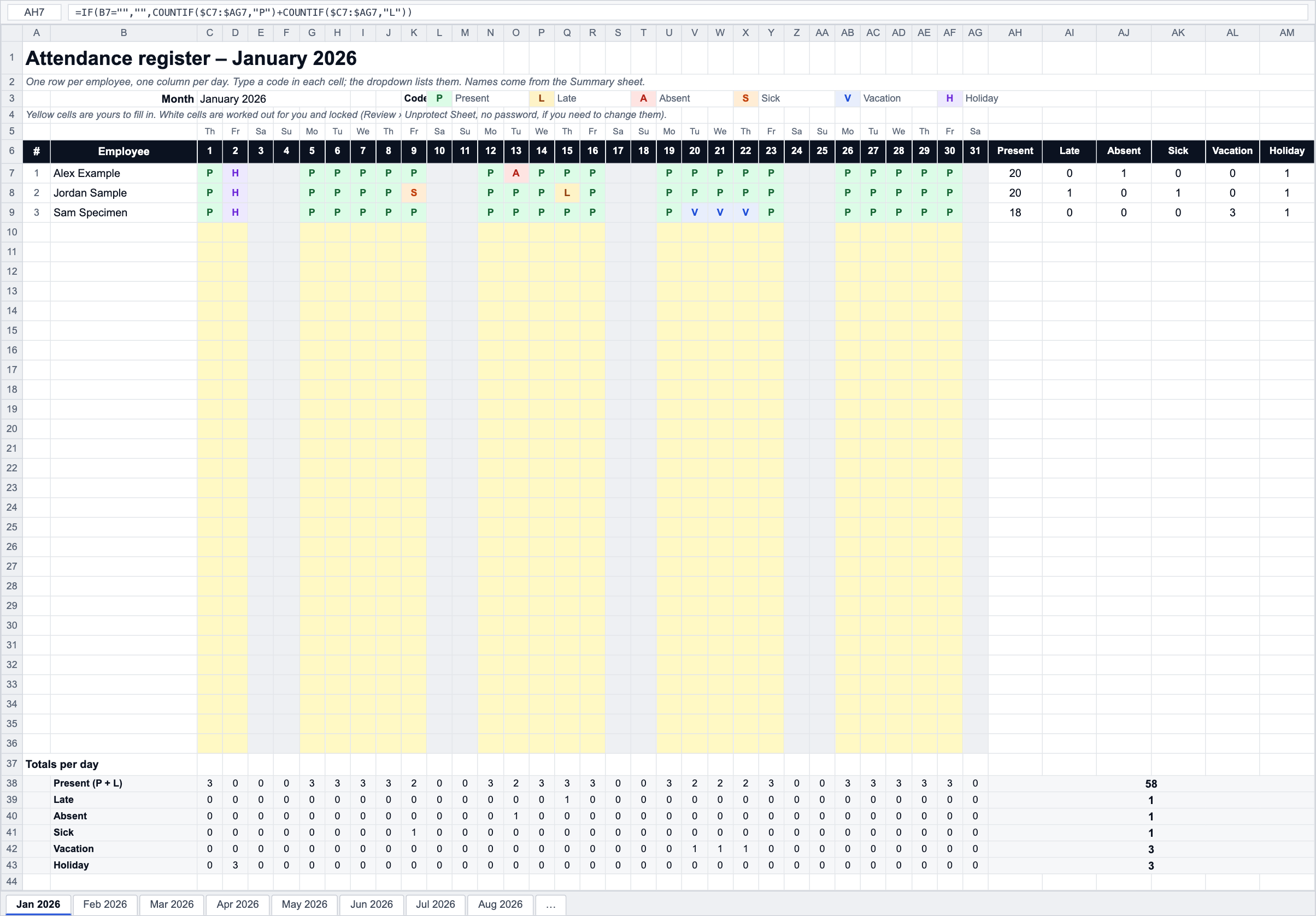
A year of attendance in one workbook: a sheet per month for 2026 plus a blank one, up to 30 employees down the side, the days across the top, a code per cell with a dropdown and colours, and totals per person, per day and for the year.
- No sign-up
- Excel, Google Sheets, LibreOffice
- Formulas, no macros
- Prints on A4 or Letter
About this template
An attendance register is the simplest attendance record there is: who was in, who was off and why, one letter per person per day. This workbook gives you the whole year in one file. Names are typed once on the Summary sheet and appear on every month; each month sheet knows its own dates, so the weekday letters, weekend shading and the 28, 30 or 31 day columns take care of themselves.
The codes are the common six (P, L, A, S, V, H) and the totals count them per employee and per day, with Late counted as present and also on its own. There is nothing in the file about pay, sick-pay rules or public holiday dates: it records attendance, and what you do with the counts is up to your policy. For the holiday dates themselves, see public holidays by country; for the leave balances behind the V and S codes, the leave tracker template does that arithmetic.
A register works well up to a few dozen people. Past that, or when the register has to feed payroll, the reliable record is a clock-in: see what time records you must keep and how to stop buddy punching.
Background reading: Time records: what the law expects
How it works
- Download the file and open it in Excel, Google Sheets or LibreOffice.
- On the Summary sheet type the Year and the employee names, one per row. The month sheets pick them up.
- Open a month sheet and type a code in each day cell, or pick it from the dropdown: P, L, A, S, V or H. The cell colours itself.
- Read the totals per employee on the right and the totals per day under the grid.
- Back on Summary, see the year per employee and the month-by-month totals for all staff.
- Use the Month sheet for any other period: give it a date and it works the same way.
Frequently asked questions
What do the attendance codes mean?
P present, L late (present but arrived late), A absent, S sick, V vacation (annual leave), H public holiday. L counts towards Present in the totals and is also counted on its own, so a person who was in every day but late twice shows 22 present and 2 late. You can type your own codes, but only these six are counted.
How do I add more than 30 employees?
Unprotect the sheet (Review › Unprotect Sheet, no password), copy the last employee row and paste it below as many times as you need, then extend the ranges in the totals-per-day rows and on the Summary sheet. Do the same on each month sheet, or do it once on a month sheet and copy that sheet.
Can I use it for a different year?
Yes: change the Year on the Summary sheet and all twelve months re-date themselves, including the weekday letters and the length of February. The entries you typed stay where they are, so clear them first if you are starting a fresh year.
Why are some day columns grey?
Days that do not exist in that month (29–31 in a short month, 29 February in a non-leap year) are greyed out by a conditional format, and weekends are lightly shaded. You can still type in them; the colours are only a guide.
Is this enough as a legal time record?
It depends on where you are. Many countries require a record of hours worked per day, not just presence, and some require it to be kept for years. A register covers presence and absence; for hours, overtime and breaks you need a timesheet or a clock. See the time records guide.
Free to download and use, including at work; no sign-up and no tracking inside the file. The template does the arithmetic with the numbers you give it: it has no tax rates and no legal limits built in, because pay, overtime and leave rules are set by each country's law and by your contract. Check anything that matters with your labour department or payroll.
Do this automatically
PunchClock keeps the register for you: every clock-in, late arrival and absence is recorded as it happens and the month is ready to export.